Browser extension · Chrome

WCAG scan from your browser, in one click.

Open the panel, press scan, see the WCAG 2.1 AA score and the accessibility issues that matter. Same rule engine our paying customers run on a schedule, but right where you are debugging.

Add to Chrome →Or run a free web scanv0.1.1 · MV3 · 0 trackers
Available in the Chrome Web Store

Result panel

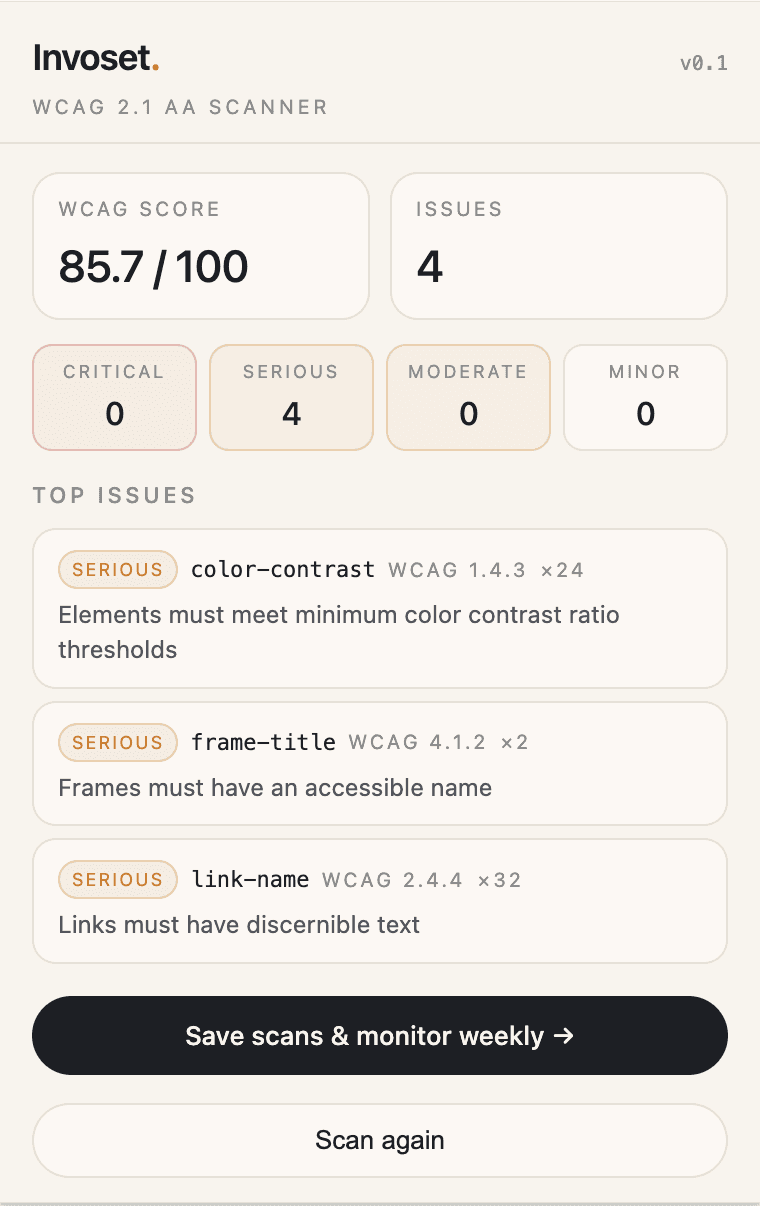
Score, severity, and the rules that fail, shown plainly.

Same test our scanner runs in production: WCAG 2.1 A and AA, plus WCAG 2.2 target size. Cached on-device until you sign up to save it.

  • 01

    WCAG score

    Pass-fail ratio across applicable rules, not a vanity badge.

  • 02

    Severity breakdown

    Critical, serious, moderate, minor. Bucketed by axe-core impact.

  • 03

    Top failing rules

    Each item shows the rule, WCAG criterion and how many nodes are affected.

  • 04

    Save scans & monitor

    One click sends the result to your account and turns on weekly re-scans.

Invoset extension popup showing a WCAG score, severity breakdown and top failing rules
Result · cached locally

How it works

Open the panel, click scan, read the result.

Invoset.v0.1
Scan this page

01

Open the panel

The popup tells you which page is in scope and asks for one click. Nothing runs in the background.

Scanning

02

Click scan

The extension injects a vetted rule engine into the active tab and tests against WCAG 2.1 A and AA, plus the WCAG 2.2 target size rule.

WCAG score85.7
0
4
0
0

03

See the result

Score, severity, top failing rules. Stays on your device until you sign up to save it.

Privacy posture

Anonymous by default. Nothing leaves your machine until you ask it to.

On your device

  • Page audit runs in the active tab, in your browser
  • Result cached locally until you close the popup
  • No analytics, no third-party scripts, no telemetry
  • Works offline once installed

Only when you opt in

  • "Save scans" sends the result to your Invoset account
  • Weekly re-scans require a verified domain on a paid plan
  • Export and audit-trail PDFs are dashboard features

Chrome accessibility checker FAQ

Is the Invoset Chrome extension free?
Yes. The extension is free to install and use, with no account and no scan limit.
Does the extension send my page to Invoset?
No. The accessibility checker runs inside your browser on the page you are viewing. The page content and the results stay on your device; nothing is uploaded.
What does the accessibility checker test?
It runs the WCAG 2.1 Level A and AA rules of the axe-core engine, plus the WCAG 2.2 target size rule, against the page as it is currently rendered. Because it runs in your browser, it can check pages you are signed in to, which the web checker cannot reach.
How is it different from Invoset monitoring?
The extension checks one page at a time, when you click. A monitored site is re-scanned across its pages on a schedule, compared with the previous scan, and archived with dates so you have a record of your testing over time.

Want to test a page without installing anything? Use the free online WCAG checker, or read how our scanning works.

Try it

Spot-check a page in Chrome, then move up to full monitored coverage.

The extension is for one-off checks. Invoset monitors your whole site on a weekly or monthly schedule and keeps a dated audit archive. Every new account runs the first scan free.